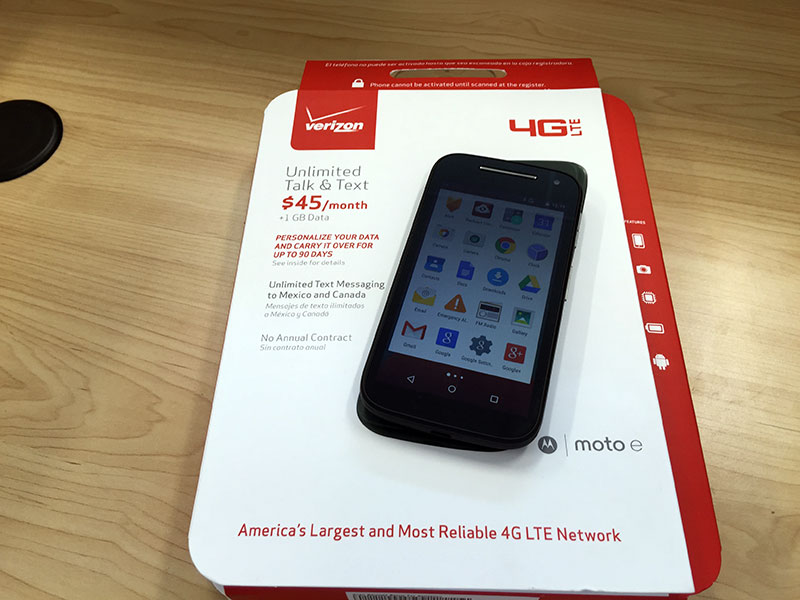
Verizon Moto E 2015 PrePaid
Motorola released the second generation of their Moto E in 2015. I was curious about this device because of its near-stock Android experience. Best Buy has this phone in its prepaid flavor for $69. I thought I would give it a try. The Verizon store also has the device but they will not sell it to you unless you activate it before leaving the store.
Unboxing
The package is simple, nothing fancy. The phone is enclosed in plastic. It comes with a sim card and wall charger. It also comes with a manual and information about the radio frequency. Two things right off the bat I had a hard time with. The first is taking off the plastic screen protector advertises some of the phone’s feature. A trick you can do is peel it from the top where the speaker is. If you try to peel from the bottom left as it suggest, you will have a difficult time. The second is removing the plastic band was a little tricky. Once you remove it though, you will find the sim card slot and the micro SD card slot.

Hardware
For the price, the phone is a good deal. It has a Snapdragon 400 quad core processor running at 1.2GHz with 1GB of ram. You shouldn’t have issues with basic gaming. It comes with 8GB of storage but approximately 5GB of that is useable. With the microSD slot you can add an additional 32GB of storage. It has a 4.5″ qHD (960×540) with Gorilla Glass 3 display. It also has Bluetooth 4.0 and NFC support.
Software
You get near-stock Android experience. As of May 2015, you get Android Lollipop 5.0.2. Motorola has announced an update to 5.1 soon to be available as an OTA. The latest is 5.1.1, but at least you have a newer version than many expensive flagship phones out there. There are some Motorola apps preinstalled as well as some from Verizon. You can disable them but they still use up storage resources. Based on my searching, this model (XT1528) has a locked bootloader. Hopefully in the future it changes. The phone is also locked to Verizon even though most of the LTE smart phones come unlocked.
Camera
The phone comes with a 5MP camera and 0.3MP front-facing camera. I have taken some shots indoors and the outcome is not that great. At full view, it’s a bit grainy. I’m not sure if I’m just used to view photos taken at higher resolution or I had higher expectations on the camera.


The video can capture up to 720p at 30fps.
Conclusion
The phone is affordable and the specs are reasonable for the price. On top of that, I was able to activate as a postpaid device – without waiting for the 6 month period. I just called customer service and provided the IMEI and SIM number.
The easiest way to peel the factory screen protector is to get your own Scotch tape and put it on the corner of the factory screen protector and use your tape to peel off the screen protector. This phone will also work with T-Mobile. There are instructions on XDA on how to get it working on T-Mobile.
The easiest way to peel the factory screen protector is to get your own Scotch tape and put it on the corner of the factory screen protector and use your tape to peel off the screen protector. This phone will also work with T-Mobile. There are instructions on XDA on how to get it working on T-Mobile.